
A manufacturer in Surat's Ring Road textile market has 60 new banarasi and organza sarees ready to list this week. Each one needs to look different enough to stop a scroll on Meesho, true enough in colour that a buyer in Lucknow doesn't return it, and shot with the zari catching light instead of flattening into a grey smudge. He has a photographer he trusts, but booking a model for 60 SKUs means either a two-day shoot he can't afford or a flat-lay that undersells every piece. This is the daily arithmetic of saree product photography for anyone selling ethnic wear online in India, and most sellers are solving it wrong.
The problem isn't lighting gear or camera skill, though both matter. It's that a saree is genuinely harder to photograph than almost any other garment category, and the economics of shooting it properly, on a model, for every design, every colourway, every season, don't work at the volume Indian marketplace sellers actually operate at. This guide covers what makes saree photography different, how to get it right whether you're shooting flat-lay or model-worn, and where AI photoshoot generation is changing the cost equation for manufacturers who used to treat model shoots as a luxury they simply skipped.
Why saree product photography is harder than other garments
A kurti or a shirt has a fixed shape. You lay it flat, it holds its form, you shoot it. A saree is six-plus metres of unstitched fabric that only becomes a garment when it's draped, and the drape is doing most of the selling work. A buyer isn't just evaluating the fabric, she's evaluating how it will fall on her, how the pallu sits, whether the border shows the way it should.
Three things make this category uniquely difficult:
Fabric texture and sheen. Silk, georgette, organza, and cotton all reflect light differently. A banarasi's zari work needs directional light to show the metallic thread without blowing out into a white glare. Chiffon and georgette need enough light to show translucency without looking washed out. Get the lighting setup wrong and a ₹15,000 saree photographs like a ₹1,500 one.
Drape consistency across listings. If a seller shoots 40 sarees over three sessions with three different drapers, the pallu length, pleat count, and pin placement all drift. Buyers comparing similar sarees side by side notice when one looks styled and another looks thrown on. Consistency, not just quality, is what makes a catalogue look professional.
Model cost multiplied across every SKU. This is the one that actually breaks seller economics. A single studio model-shoot session in India, with a stylist and a professional draper, commonly runs ₹10,000 to ₹30,000 depending on city and complexity (Ravikant Photography, 2026; Parwez K Photography). Basic marketplace catalogue images without a model run closer to ₹200–500 per photo (Ravikant Photography, 2026). Multiply either number by 60 SKUs and a full season's new stock and you understand why so many saree sellers on Meesho default to flat-lay or mannequin shots even though they know model-worn photos convert better.
Draping styles that actually photograph well
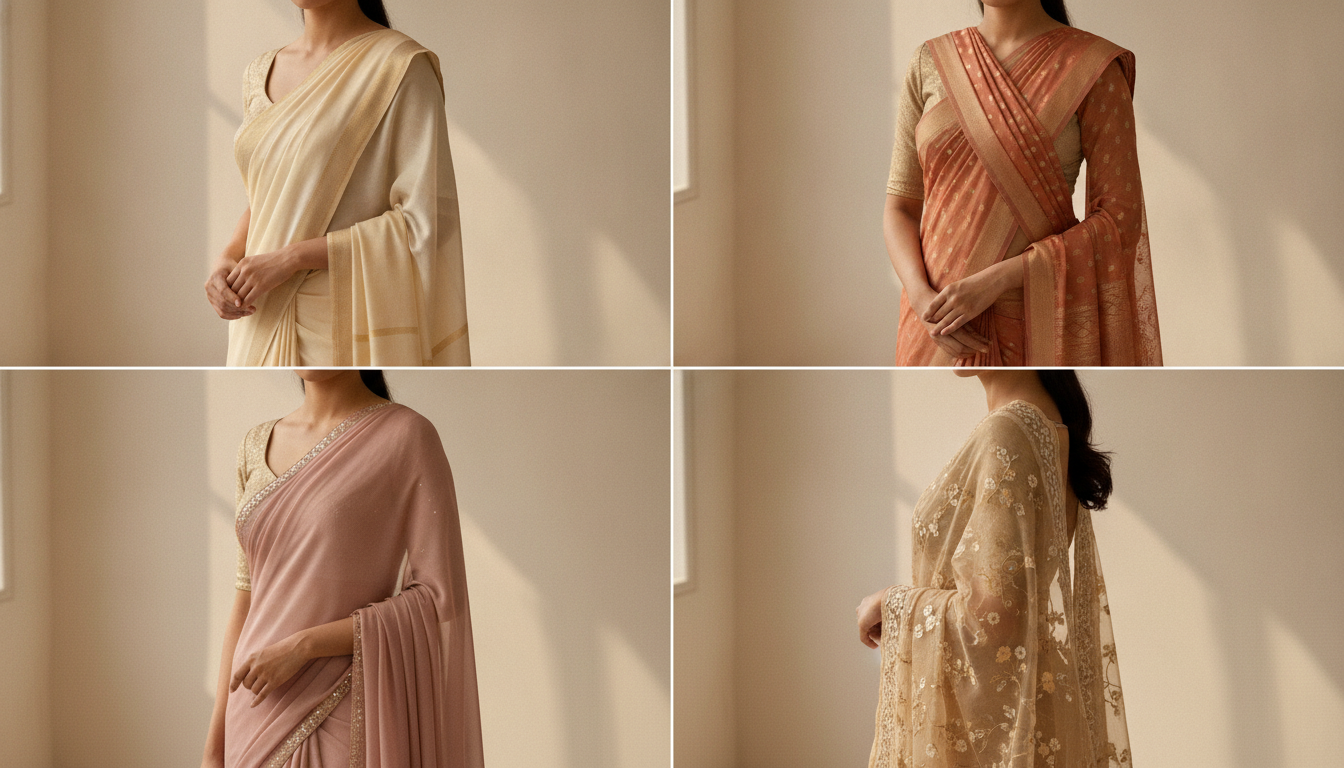
Not every drape suits every saree, and the drape you choose changes what the camera needs to capture.
Nivi drape is the default for a reason. It's the most universally recognised style across India, shows the pallu and border clearly, and photographs well from the front and three-quarter angle. Use it as your default for general-market listings, especially on Meesho and Flipkart where buyers span every region.
Bengali drape with the front pleats and the distinctive pallu wrap works better for heavier silks like Kanjeevaram, because the extra fabric at the shoulder shows off border weight and zari density that a nivi drape hides.
Gujarati/Seedha pallu drape, where the pallu comes over the right shoulder and drapes down the front, is worth shooting as a second angle for lightweight and printed sarees, since it shows the full print or motif spread across the front instead of tucking most of it behind.
For catalogue purposes, most sellers only need one drape style shot consistently across the whole range, plus a close-up detail crop of the border and pallu. Trying to shoot every drape for every saree is how photography budgets spiral without adding real conversion value.
Lighting for zari, silk, and sheer fabric
Get this part wrong and no amount of retouching saves the shot. A few rules that hold across most saree categories:
- Use soft, diffused light from two directions rather than one hard source. A single spotlight creates a hotspot on zari work and leaves the rest of the drape flat.
- Shoot zari and metallic borders at a slight angle to the key light, not head-on, so the thread catches highlight without turning into a white blur.
- For sheer fabric (georgette, chiffon, organza), backlight subtly to show translucency, but keep a strong front fill so the pattern and colour still read accurately on screen.
- Colour-correct against a physical swatch, not just your camera's white balance. Saree colours are the single biggest driver of returns and complaints when they photograph differently than they arrive (Studiofy, 2026).
Flat-lay vs model-worn: what actually converts
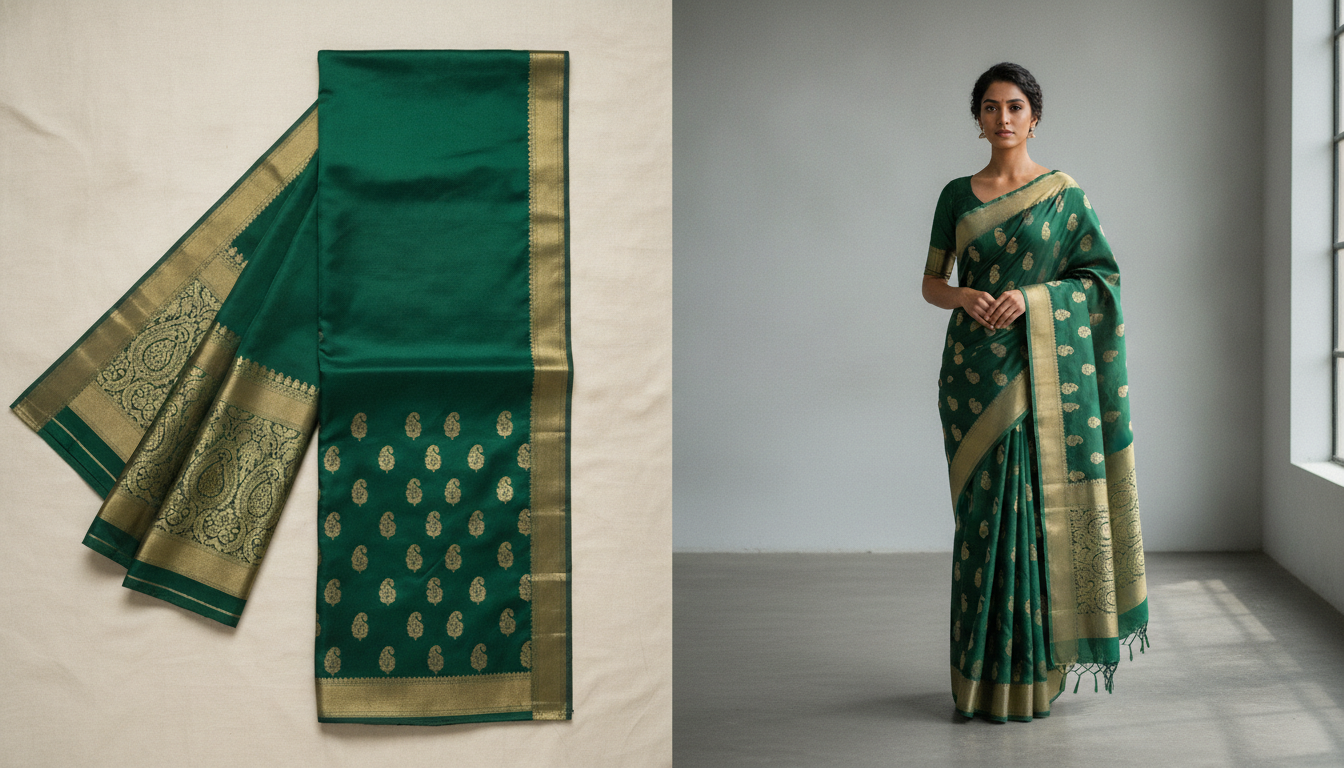
Both formats have a job. The mistake is picking one and skipping the other.
Flat-lay is fast, cheap, and consistent. Lay the saree with the pallu styled to show the border and motif, shoot from directly overhead, and you get a clean, accurate colour reference. It's the format most sellers default to because it doesn't need a model, a stylist, or a draper. But a flat-lay asks the buyer to imagine how the saree will actually look worn, and imagination is friction. Buyers weighing two similar sarees side by side pick the one they can actually picture on themselves.
Model-worn shows the drape, the fall, the way the fabric moves, and gives a sense of scale and proportion a flat-lay can't. On Myntra specifically, a full-length real model on-model shot is close to a requirement, not an option, for apparel listings (Kraftr, 2026). It's also simply what converts better for ethnic wear, where the whole point of the garment is how it drapes on a body.
The honest answer is you need both: a flat-lay or ghost-mannequin shot for accurate colour and detail, and a model-worn shot to sell the actual experience of wearing it. The problem has never been knowing this. It's been affording the model-worn half for every single SKU.
The real fix: AI photoshoots for saree sellers
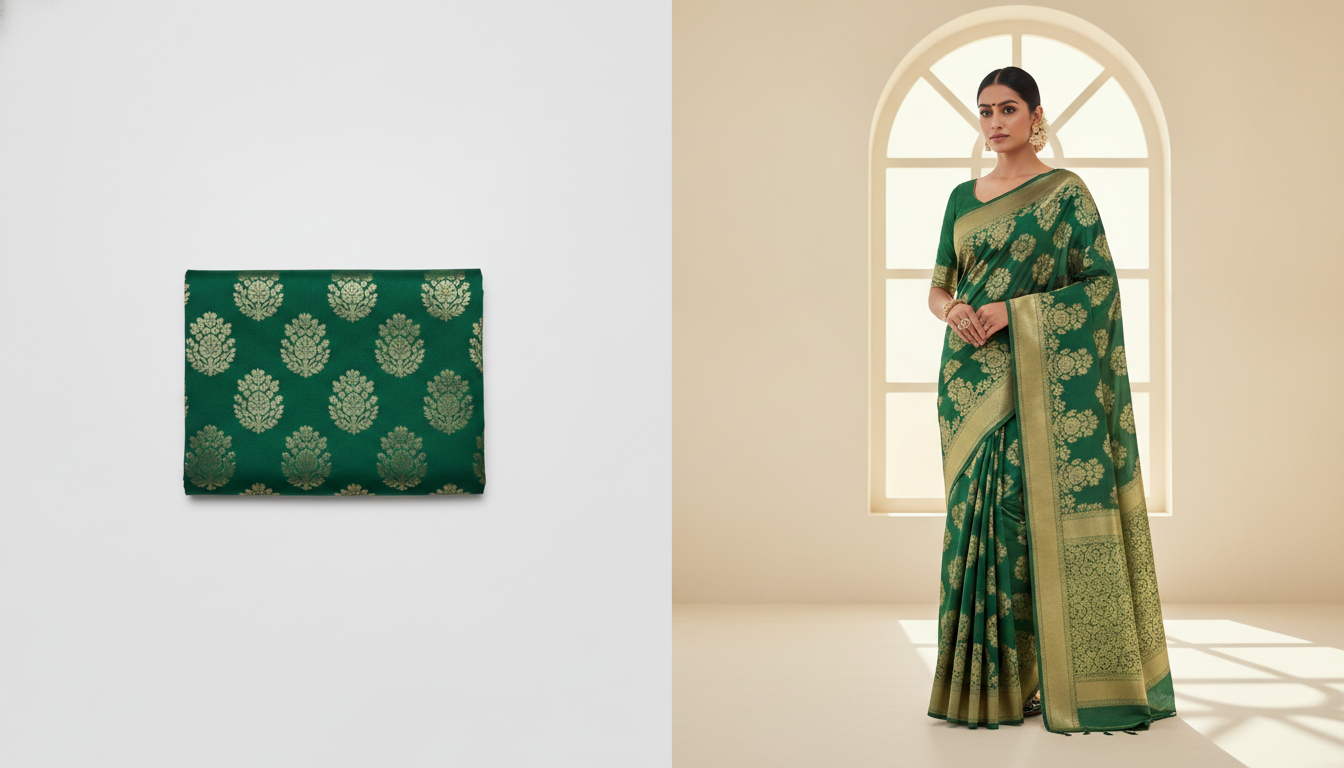
This is where the economics change. Instead of booking a model, stylist, and draper for every new saree design, a seller shoots one clean flat-lay or hanging photo of the saree itself, in good light, showing the colour, border, and texture clearly. An AI photoshoot tool then generates that exact saree draped on a model, in a chosen pose and setting, without a physical shoot happening at all.
For a Surat manufacturer with 60 new designs a season, this is the difference between shooting 60 SKUs on a model at ₹10,000–30,000 a session (only realistic for a handful of hero pieces) and generating a model-worn image for every single design from the same source photo workflow. The saree itself was always going to be photographed for the flat-lay reference anyway. The AI step adds the model-worn version on top, at marginal cost per additional image instead of marginal cost per booking.
This doesn't replace good saree photography practice, it depends on it. The AI model can only drape and light what it can clearly see in your source photo, so the same rules apply: shoot the saree flat or hung in even light, get the zari and border detail sharp, and get the true colour right before you generate anything. A blurry or poorly lit source saree produces a blurry or poorly lit AI result. Garbage in, garbage out still holds, it's just that "in" now only needs to happen once per design instead of once per shoot.
Scalio is built for exactly this workflow: upload a photo of the saree, add brand context, and generate it worn by an AI model in minutes, ready for Meesho, Flipkart, or Myntra listings, at ₹999–1,999/month instead of a ₹10,000-plus agency or photographer retainer per session (scalio.app).
Marketplace image requirements for saree listings
Every marketplace has its own specs, and getting rejected on a technicality after you've already generated or shot your images wastes the whole cycle.
Meesho requires square (1:1) images, minimum 1000×1000px (2000×2000px recommended for sharpest display), JPEG or PNG, on a pure white or light neutral background, up to 7 images per listing with at least 4 recommended (front, back, side, detail) (MeeShip, 2026; StitchMagic, 2026). Note that Meesho's stated catalogue policy prohibits AI-generated or edited imagery for the product itself, so treat AI-generated model shots as a tool for Instagram, ads, and other marketplaces rather than assuming blanket approval on Meesho listings, and check current policy before uploading.
Flipkart wants a 1:1 aspect ratio, minimum 500×500px but 1000×1000px or higher to support the zoom feature buyers rely on, plain white or light background, no logos or promotional text overlaid on the image (PicToPose, 2026).
Myntra is the strictest on model shots: 3:4 portrait aspect ratio, minimum 1080×1440px (1500×2000px recommended), pure white #FFFFFF background, and a minimum of five image slots including front on-model, back on-model, a three-quarter angle, a fabric/border detail crop, and a styled look shot (Kraftr, 2026).
Build your source photography and any AI-generated variants around the strictest of these (Myntra's spec) and you can crop or reformat down for Meesho and Flipkart rather than reshooting per marketplace.
Common mistakes saree sellers make
A few patterns show up again and again in seller catalogues that otherwise have decent photography:
- Inconsistent drape across a range. Buyers browsing a seller's full catalogue notice when pallu length and pleat styling shift saree to saree. Pick one drape style as your default and stick to it.
- Colour that doesn't match reality. Uncorrected white balance under warm indoor lighting is the single biggest cause of returns for saree sellers, since colour is often the whole reason someone bought.
- Only shooting flat-lay because model shoots are too expensive. This is the gap AI photoshoot tools are built to close, not a permanent trade-off.
- Ignoring the border and pallu close-up. For sarees specifically, buyers zoom into the border and zari work more than almost any other garment detail. A missing detail shot costs conversions.
- Shooting every SKU in a rush at season-end. Drape and lighting consistency both suffer when 60 sarees get shot in one exhausted afternoon. Standardising the source-photo step (even just the flat-lay) makes it easier to keep quality steady, especially once model-worn generation happens separately from the physical shoot.
FAQ
What's the best background for saree product photography? A plain white or light neutral background works best for both marketplace compliance and buyer focus. Meesho, Flipkart, and Myntra all require white or near-white backgrounds on primary listing images, and it also makes colour-matching and later editing (including AI photoshoot generation) far more reliable than a patterned or dark backdrop.
Do I need a real model for saree photography, or can AI generate one? You need at least one clean, well-lit photo of the saree itself either way. From that source photo, an AI photoshoot tool can generate a realistic model-worn version without booking a physical model, stylist, or studio. This is now standard practice for sellers who need model-worn images across many SKUs but can't afford a shoot for each one.
How many product photos does a saree listing need? Myntra requires a minimum of five image slots for apparel (front, back, three-quarter, fabric detail, styled shot); Meesho recommends at least four. A safe default for any saree listing is one flat-lay or ghost shot for accurate colour, one to two model-worn angles, and one close-up of the border or zari detail.
Why do my saree photos look flat or washed out? Usually single-direction hard lighting, incorrect white balance, or shooting sheer/metallic fabric without adjusting for how it reflects light. Diffused two-direction lighting, colour-correcting against a physical swatch, and slightly angling zari work away from head-on light fix most of this.
The takeaway
Saree product photography is genuinely harder than most garment categories, but the part that actually limits sellers isn't skill, it's the cost of putting every SKU on a model. Get the fundamentals right (consistent drape, correct lighting for the fabric, accurate colour, marketplace-compliant specs) and you've solved the photography problem. Solving the model-cost problem is what AI photoshoot generation is for: shoot the saree once, generate the model-worn version for every colourway and design, and stop treating model shots as a line item you can only afford for your best five pieces.
If you're a Surat or Jaipur manufacturer sitting on a season's worth of new sarees and a photography budget that doesn't stretch to a model shoot for each one, that's exactly the gap Scalio closes. Upload a photo, add your brand context, and get model-worn saree images ready for Meesho, Flipkart, and Myntra in minutes, from ₹999/month. Start free at scalio.app.